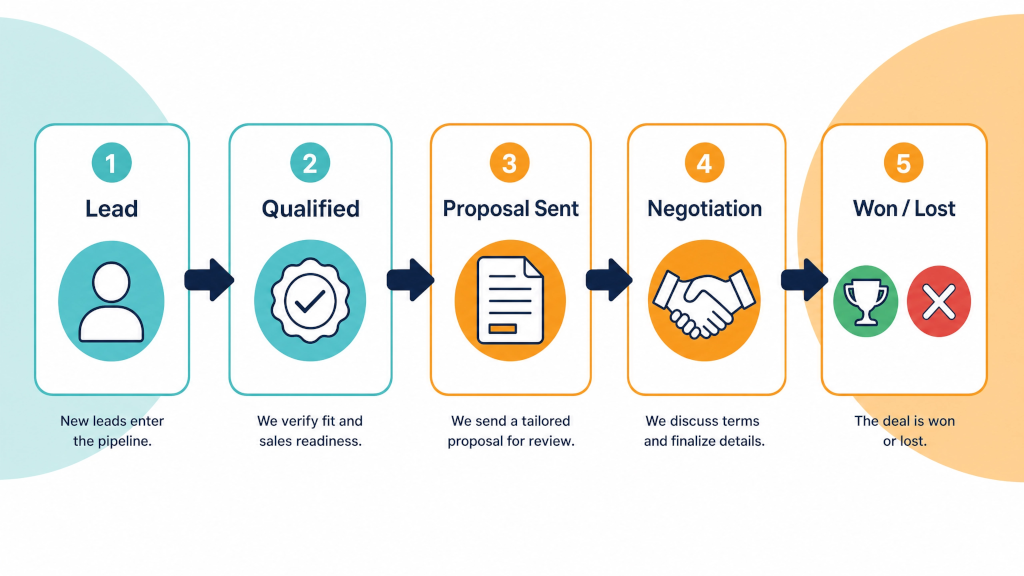

You have a pipeline that matches how you sell, and every open quote is in it. That part of your Pipedrive trial was covered in Part 1. The next two and a half weeks will determine whether the trial ends up being useful. The best way to learn how useful the CRM is, is to use it every day with real deals that you're trying to close.
A CRM you look at once a week is a spreadsheet with a nicer font. It will begin to prove it's worth when - for example - it changes what happens to a quote on a Tuesday afternoon when the phone is ringing and nobody has chased last week's jobs.
If it happened in your sales process, it needs to be recorded in Pipedrive.
Every call, every quote, every site visit, every "I'll get back to you" promise must be recorded in Pipedrive. If you spoke to a prospect and there is no activity logged against the deal, it's basically as if it did not happen. It won't take long for you to forget the key details - unless it's recorded. This may feel slow and bureaucratic for the first couple of days. But after that it becomes the way you know what's happening in your sales process. This becomes your mode of operating - and your best practice.
Give your team the same rule, and make it specific, because "use the CRM" means nothing. Before you finish for the day, every deal you worked on that day has a note and a next activity.
Connect your email first, because most of the excuses for not using a CRM come down to "I'd have to type it in twice". You want all your email conversations automatically logged in the CRM.

Connect Gmail or Outlook and you'll avoid the need for double handling and re-typing information. Emails to and from a contact are linked to their deal without anyone doing anything. You can send from within Pipedrive, and the quote email you usually send fifty times a year becomes a standard email template. You also get to see whether the quote has been opened (if you've turned on email open and click tracking), which really helps with the follow-up call.
Turn email sync on for everyone - especially team members who sends quotes. Someone will be nervous about their whole inbox syncing - there are ways around that. It is possible to only sync e-mail from specific folders in Outlook or labels in Gmail - or (by using custom automation) only linked to contacts already in Pipedrive.
Open a deal the next morning (or sooner for more recent conversations) and the whole conversation should be visible in the deal or contact's timeline.
If you or your team tend to quote on site, the mobile app will be one of the most important elements of the trial, because that is where the deal gets entered or forgotten.
Standing in a driveway after a site visit, you can add the deal, set its value, log the visit and set the follow-up before you get back in your car. If it takes more than a minute, something in your set-up is wrong - usually too many required fields at that stage. Go back and simplify them.
Turn on caller ID in the app. When a prospect rings, you'll see who it is and what stage they are at before you answer. You can turn the Caller ID option on under More (...) > Preferences.
A deal in Pipedrive without a scheduled activity is a deal nobody is responsible for. Pipedrive clearly indicates this - deals with no next activity are flagged in the pipeline view with a yellow triangular alert icon.
Here's one important habit to build: every time you make any update to a deal, you set the next activity, with a date. Call, email, site visit or follow-up for example.
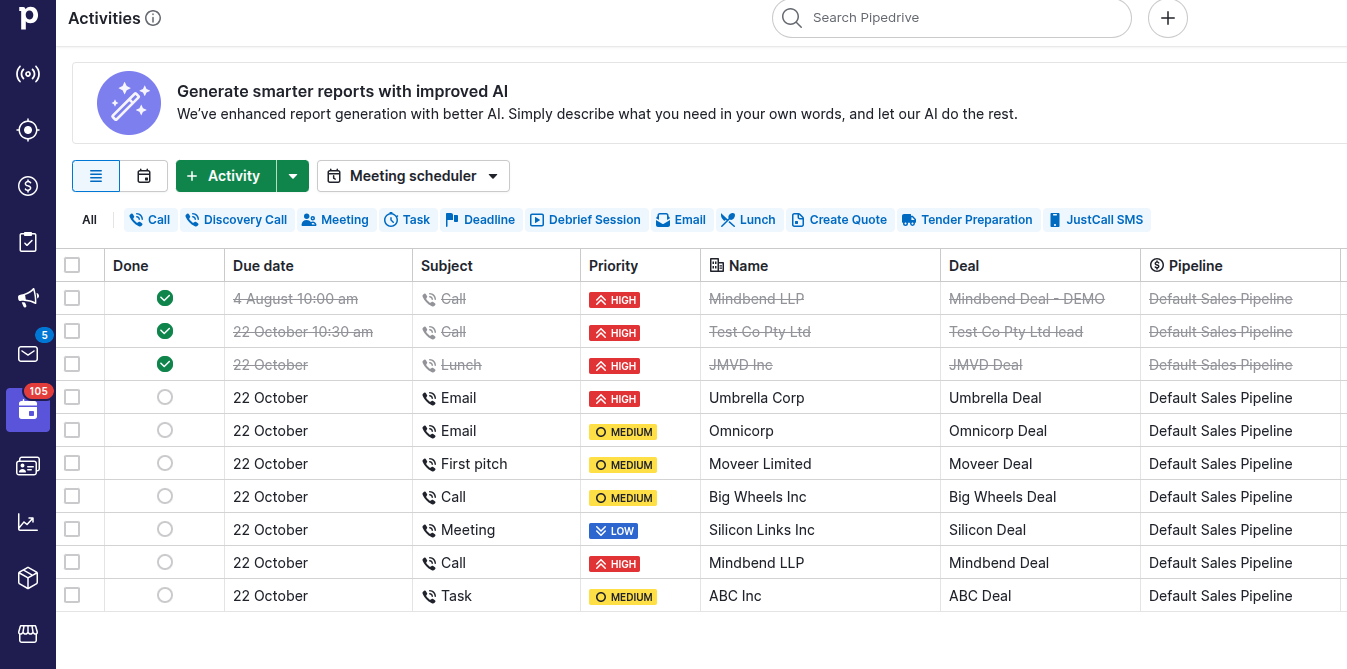
Then each morning, open the activities list instead of the pipeline. It shows every follow-up due today, for everyone. You'd typically only focus on your own activities - unless you're covering for a colleague who's away or you're managing a team. That list - and your activity-synced calendar in Outlook or Gmail - is how you manage your day. Work down the list. When you finish one activity, set the next activity for that lead, contact or deal.
If you follow just this exact process for two weeks, you will already know whether Pipedrive is worth paying for. Most of the businesses we work with find their first missed follow-up pretty quickly - for example, a quote that went out and nobody had chased. That one job usually covers the subscription. Often there are literally tens of opportunities that can be progressed and closed by adopting effective activity management in Pipedrive.
Pipedrive's Automations do the chasing up for you. The temptation is to automate everything. Don't do that during the trial. Instead, build one automation at a time, monitor it working and then make your decision.
Build the follow-up after a quote first. Set it so that the moment a deal lands in "Quote sent", Pipedrive adds a follow-up call activity on the deal owner's list three working days out. That is the whole thing - one trigger, one action - and it means a quote cannot go out without the follow-up already booked. If you want a second one, make it an email: when the deal moves into "Quote sent", add a 7 day delay and send the "Following up on your quote" template email from the owner's address. Stop at two for the trial.
Watch your automations run on real deals for a week. If a follow-up fires at the wrong time, fix the trigger. This is where you learn whether your stages from Part 1 were right - an automation that misfires is usually a stage definition that was not accurately defined.
Once the trial is over and you want more, five automations that save a sales team hours every week has the next ones to build, with instructions.
By now the deals you started with are being worked on. The next thing to test is what happens to a brand new enquiry. Ideally you'd want it to turn up in Pipedrive without anyone having to add the details manually.
Put a web form on your contact page for the length of the trial (or integrate one if you already have a contact form - contact us if you need further details). Submissions go into the Leads inbox, which holds enquiries you have not qualified yet, and you convert those worth quoting into deals. Phone enquiries follow the day 4 rule - whoever answers creates the lead while they are still on the call.
How to use the Leads inbox up properly has its own topic - the three-part Leads Inbox series covers capture, qualification and the automations behind it.
Somewhere around day 15, it's worth booking a meeting with your other Pipedrive users (if you're not the only one) and asking them:
This is also the point to book the free one-hour call if you have not used it yet. Bring your answers the the questions above. In practice, the changes you'll need will be quick and will make a big difference to your experience of using Pipedrive.
By day 20 - with 10 days still left in your trial - here's where you'll hopefully be:
If that is true, you are ready for Part 3 - the four reports to read, and how to move to a paid account without losing anything.
If it is not true, use the extended 30 days and book the call. The most common reason a trial fails is that nobody had a plan for what to do during the trial - and you have one now.
Previous: Part 1 - Set up your Pipedrive free trial to match the way you sell
If you have not started yet, start the Extended 30-Day Pipedrive Free Trial - no credit card, and we'll help you set up your trial on a free one-hour call.
Yes. Both sync two ways. Emails to and from your contacts attach to their deals, and you can send from inside Pipedrive.
Yes, for iOS and Android. You can add deals, log calls and visits, set activities and see your pipeline. It is the right place to test the trial if you work on site.
Every time you work on a deal. The rule is that before you finish for the day, every deal you spoke about has a note and a next activity with a date.
A deal that has sat in a stage longer than the rotting time you set for it. It changes colour in the pipeline so a quote that went quiet ten days ago looks different from one that arrived today.