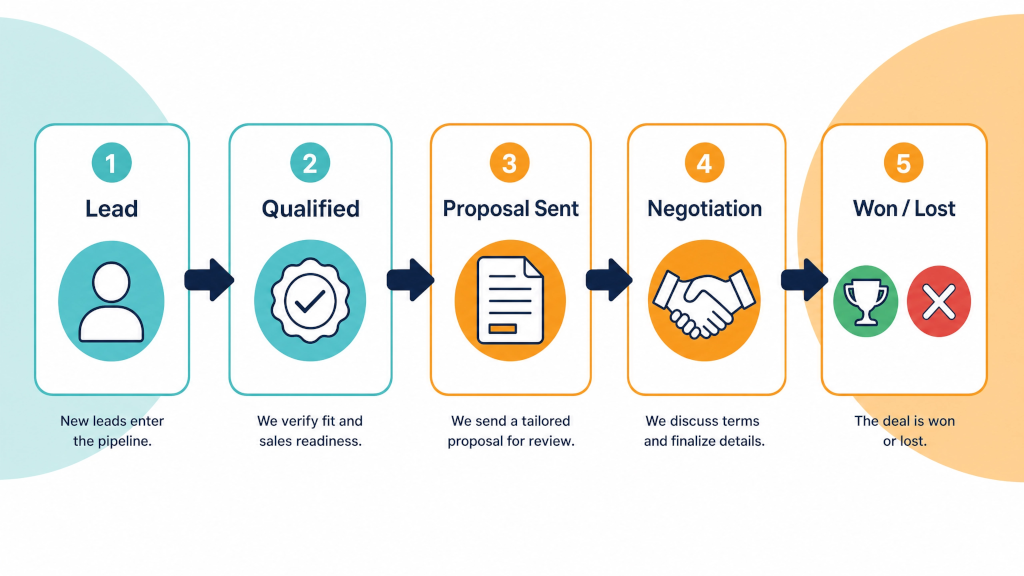

A guide for SMEs considering a work-management platform vs a dedicated sales CRM.
Last reviewed: August 2026. Email sync, forecasting, report limits and other capabilities will vary by subscription tier - please check the current vendor pages before choosing.
Disclosure: Process Culture is an Authorized Pipedrive partner. We also design and build ClickUp integrations for delivery teams. This comparison reflects the trade-offs we see during client implementations, including the limitations of both approaches.
ClickUp and Pipedrive can both support customer management, but they are optimised for quite different jobs.
Pipedrive is a dedicated sales CRM - a CRM built by sales people for sales people: people, organisations, deals, activities and sales reporting are native records that fit within a typical sale centric model.
ClickUp provides CRM templates and suitable building blocks, but its CRM is configured from task records, hierarchy, custom fields, relationships and automations - flexible, with the design and governance sitting with your team.
If your priority is running a well designed and repeatable sales process - shared email history, next-action discipline, sales reporting - Pipedrive is usually the stronger foundation.
If you are a very small team already working in ClickUp, with a simple sales process and a willingness to maintain the structure, ClickUp can be a workable CRM.
And for businesses that sell and then deliver projects, the most practical design is often to use and integrate both: Pipedrive for the sale and ClickUp for delivery. As soon as a deal is closed in Pipedrive (marked as Won), a project is automatically created in ClickUp - the key fields are copied across, and each record links back to the other, so sales and delivery always know where to look.
Choose Pipedrive if sales is the engine of your business - you have a real sales pipeline, more than one person making updates to deals, and you need shared email history across your team, follow-up discipline and sales reporting without designing too much of it yourselves from scratch.
Choose ClickUp alone if you are a small team with a simple sales process, you already run the business in ClickUp, and you accept owning the CRM design and its upkeep in exchange for one core platform. That is a legitimate choice at that size. Reconsider this approach when more than one person must work the same deal, prospect history is spread across mailboxes, handovers become common, or leadership needs reliable stage conversion, activity and forecast reporting.
Choose both if you sell and then deliver - projects, installs, engagements, retainers. Pipedrive for the pipeline, ClickUp for the work, an automated hand-off once a deal is marked as Won in the sales CRM (Pipedrive). For most established SMEs we work with, this is the answer.
Pipedrive was built with a core focus: moving deals through a pipeline. That pipeline focus is evident everywhere. Every deal links to its related people and organisation without any additional setup. On plans with email sync, the conversation history is typically directly attached to the record whether or not the salesperson remembered to manually log it. As long as they've set up email sync (with their Office 365 email or Google Workspaces, for example) then emails should automatically be associated with deals and contacts. There are many nuances, but generally this capability works out of the box.
The pipeline view makes missing or overdue next actions visible (via activity markers on the main deals Pipeline, for example) - the single behaviour that keeps pipelines up to date and relevant. As a result, your sales reporting answers sales questions - what is converting, which deals are currently stuck and what the quarter looks like. Much of this is achievable out of the box - without custom coding.
The other advantage is harder to see in a feature list: Pipedrive is quite opinionated. Salespeople get a pipeline view and an activity / call list, not a workspace they can rearrange. While you can certainly customise Pipedrive to meet your own specific sales process, the general structure and key entities are defined by Pipedrive and by sales best practice. In our client work, that constraint is a feature. CRMs fail through inconsistent use far more often than through missing features.
ClickUp is a genuinely strong work-management platform, and if your team already lives in it every day, that matters. The most common CRM failure mode is nobody updating it - a CRM inside the tool that is already open gets updated more often.
ClickUp also wins outright on everything after the sale. Delivery projects, onboarding checklists, client health tracking, docs and workload planning sit in the same workspace as the client context, which reduces context switching for delivery-led teams.
And ClickUp does publish real CRM scaffolding: a Sales & CRM template, a recommended hierarchy, dashboards and automations. For a founder plus one or two people working a simple pipeline, that scaffolding can carry the load - provided the team accepts the email and reporting trade-offs above.
ClickUp is a solid solution for many businesses. That said, Process Culture recommends Asana for most client needs - clients generally find it more intuitive, and with ClickUp there's often a lot more clicking to get the same projects and tasks set up.
ClickUp can model CRM records, automate workflows and produce CRM dashboards. Those capabilities are expressed through tasks, hierarchy, fields and statuses - so your team defines the model and governs it over time. The implication is that complexity rises with more users, more records, a more complex sales process and a greater need for consistent shared history. What starts as a tidy build tends to sprawl, and keeping it clean is ongoing work that belongs to somebody.
Email is the sharpest version of the same trade-off. ClickUp's email is task-based: send from a task, see replies on that task. That is genuinely useful for contextual client work, but it is not a sales inbox that automatically associates a person's mailbox conversations with people, organisations and deals. Without that association, prospect history tends to live in individual mailboxes - and the gap gets expensive the day a second salesperson joins or someone goes on leave mid-deal.
The pattern we see work best treats this as a hand-off. Pipedrive runs the sales pipeline from enquiry to won. The moment a deal is won, it flows into ClickUp as a delivery job - client details, scope and deal value included - and ClickUp runs onboarding and delivery from there. It is the same architecture we build with Asana, SmartSuite or Pipedrive Projects on the delivery side: the CRM owns the sale, the project tool strictly owns the work. Each tool does the job it was built for, and nobody re-keys data.
Make.com, Zapier and specialist marketplace connectors can automate the hand-off.
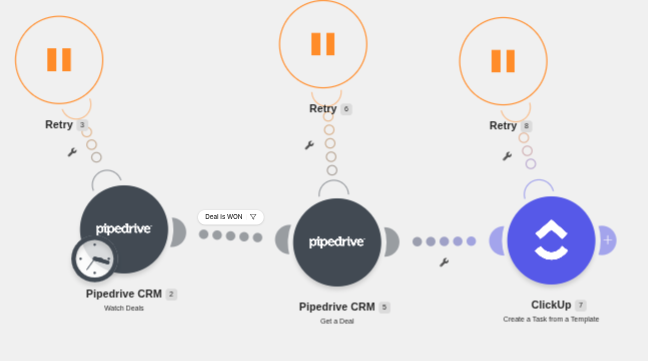
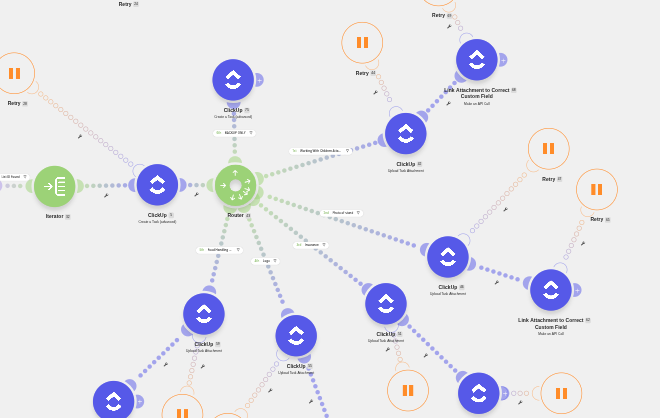
Treat it as an integration design problem rather than a plug-and-play purchase:
A good Pipedrive-to-ClickUp hand-off needs five decisions made before you build anything:
Finally, make the automation write the Pipedrive deal URL into the ClickUp task and the ClickUp project URL back into the Pipedrive deal. That one small step means anyone on either side can jump straight to the other system's record - and it turns every future "where's the info on this job?" conversation into one click.
The common objection is ending up with two siloed tools that don't talk to each other. Designed and monitored properly a well designed Pipedrive <> ClickUp integration resolves this concern. Connecting the CRM to the rest of the business, from project management to accounting and ERP, is where we do most of our integration work. It's one of Process Culture's core competencies.
Yes. ClickUp publishes CRM templates, a recommended hierarchy, dashboards and automations, and lists, custom fields and relationships can be assembled into a working CRM with deals, companies and contacts. It particularly suits small teams and account management. The model is designed and maintained by your team, and its email is task-based rather than an automatically associated sales inbox.
There is no deep first-party two-way sync between them, but third-party connectors and no-code platforms such as Make.com and Zapier can automate the common hand-offs reliably when the field mapping, duplicate prevention and error handling are designed properly. The standard pattern pushes won Pipedrive deals into ClickUp as delivery jobs automatically. There is also a current Pipedrive Marketplace app called PickUp which does exactly this.
For running a sales pipeline, usually - the CRM data model, email sync (on eligible plans), activity management and sales reporting are native rather than assembled. For managing projects and delivery, ClickUp is the better tool. While Pipedrive does have it's own project management capability - via Pipedrive Projects, Clickup is a more capable project management solution. Pipedrive and ClickUp are strongest when used together. Two tools with different roles that complement each other very well.
Recommended if more than one person works the same deals, prospect history is spread across mailboxes, handovers between team members are common, or leadership needs reliable conversion, activity and forecast reporting. If two or more of those describe you, it is usually time. Keep ClickUp for delivery and connect the two using Make.com, for example.
Both subscriptions plus a Make.com or Zapier plan, and capabilities like email sync and forecasting vary by Pipedrive tier - check current plan pages. For teams where sales drives revenue, the pipeline visibility and follow-up discipline typically pay for the second tool many times over. For more on Pipedrive pricing, refer to our most recent Pipedrive Features Article.