
Your sales reps didn't sign up to be data-entry clerks. But between logging calls, sending follow-ups, shuffling deals between stages, and tagging contacts that's exactly what they become without the right systems in place.
Pipedrive's workflow automation feature fixes this. With workflow automation you can monitor for events inside your CRM - such as the creation of a new deal, a Pipeline stage change, a completed call activity and execute key actions automatically. No clicking, no forgetting ("I'll do it after lunch").
Here are five automations that consistently deliver the biggest time savings, plus some basic instructions to help you build each one.
The problem is simple: a lead comes in, and nobody owns it. It sits there. Maybe someone picks it up tomorrow. Maybe it dies quietly in your pipeline.
This automation kills that gap.
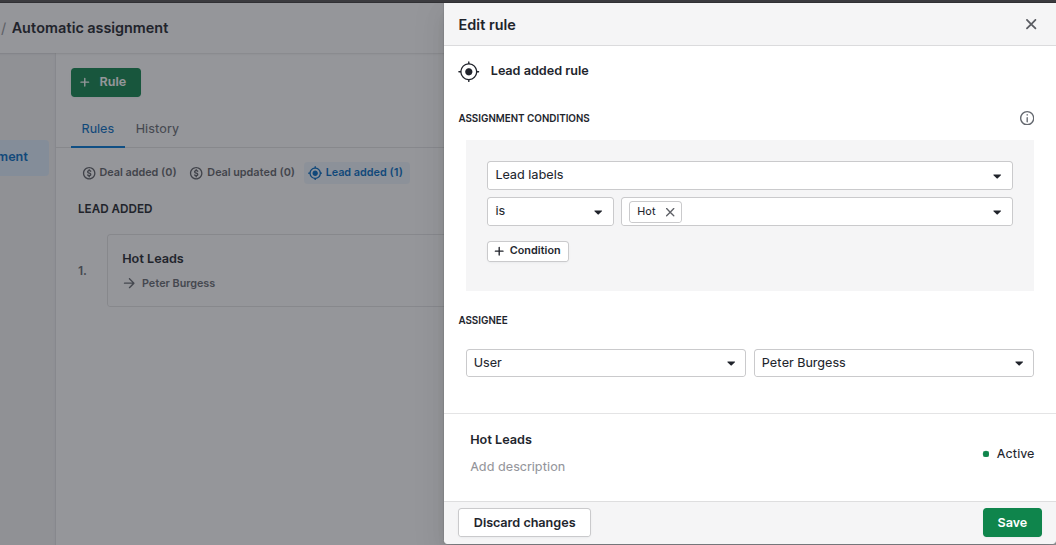
The moment a new deal enters your pipeline, Pipedrive assigns it to the right sales rep - based on territory, product line, or a round-robin rotation - and drops a task in their calendar to make first contact within 24 hours.
How to build it:
Why it works: Every inbound lead gets a response fast. Nothing slips through. And your reps stop wasting the first ten minutes of every deal figuring out whose job it is.
Alternatively you could also use Pipedrive's automatic assignment feature to set up rules for routing new leads to the correct team member. Although not as customisable as the automated workflow option above, there's enough configurability to get the job done for most cases.
A sales rep sends a proposal, mentally bookmarks "follow up Thursday," then the reminder gets buried in other deals. Thursday comes and goes without any follow up.
With this automation, the follow-up reminders go out automatically.
When a deal moves to a specific stage - say, Proposal Sent - Pipedrive fires a personalised email to the contact using a saved template. You can add a delay (two business days works well) and even create a task for the rep if the email gets opened.
How to build it:
Why it works: Your messaging stays consistent and on-brand at every stage. Prospects hear from you at exactly the right time - whether your rep remembers or not. Teams that automate follow-ups consistently see higher close rates, and the reason is straightforward: discipline (an a clear, automated process) beats intention every time.
Silent deals are pipeline killers. A prospect goes quiet, the sales rep gets distracted by hotter leads, and a deal that was genuinely winnable just fades out. Time and inactivity is a killer of deals..
This automation acts as an early warning system. If a deal hasn't been updated in five days (or whatever threshold makes sense for your sales cycle), Pipedrive pings the rep and their manager with a notification and creates an overdue task to re-engage.
How to build it:
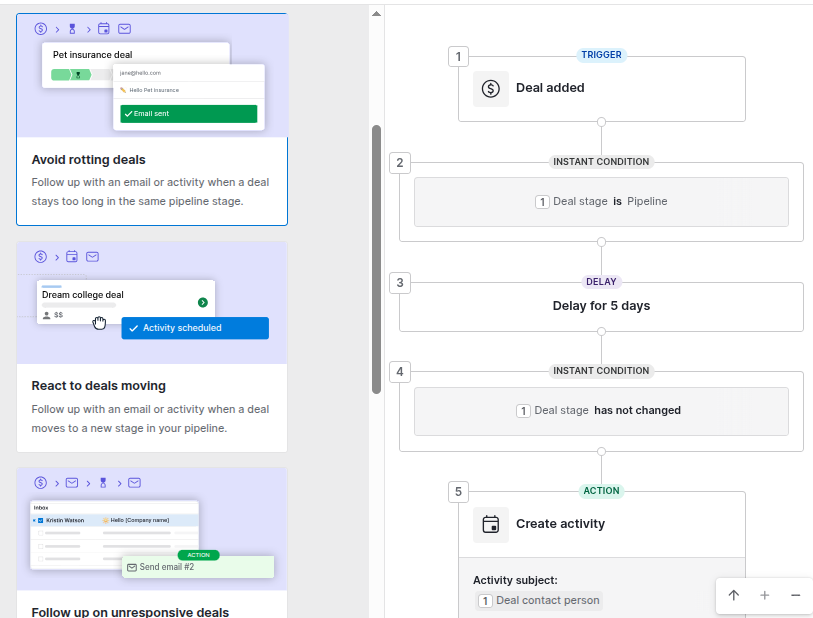
Why it works: Managers get visibility without having to chase people down. Reps get a nudge before it's too late. And warm deals stop going cold in silence — which, over a quarter, can mean the difference between hitting target and missing it.
Closing a deal feels great. What doesn't feel great? The new client sitting in limbo for three days because nobody told the operations team.
This automation bridges the gap between sales and delivery. The moment a deal is marked Won, Pipedrive emails your customer success or ops team with the deal details, updates the contact's label to "Customer," and creates an onboarding task assigned to the right Customer Service contact.
How to build it:
Why it works: Every new client gets a seamless, professional handoff from day one. No awkward gaps between "we signed" and "here's your onboarding plan." Your CRM data stays clean. And your customer's very first experience with your company after buying? It's smooth.
Reps log a call. The prospect says they're interested. The rep then has to manually drag the deal to the next stage, create a follow-up task, and update the notes.
Or alternatively - they could just mark the call as done, and Pipedrive handles the rest.
This automation watches for completed activities with specific outcomes. When a rep finishes a call and logs "Interested" as the result, the deal automatically moves to Demo Scheduled and a follow-up activity gets created for three days out.
How to build it:
Why it works: Your pipeline updates itself in real time. Reps spend less time on admin and more time actually selling. And because stages reflect what's genuinely happening - not what someone remembered to update. Your forecasting becomes significantly more accurate.
This automation solves the problem of ensuring that your prospect or client turns up for booked meetings - by sending them an SMS reminder the afternoon before a meeting.
While this reminder functionality is available by default in booking solutions such as Calendly, OnceHub, Microsoft Bookings - the solution below shows an alternative approach within Pipedrive if you're not leveraging these solutions.
If you'd like to implement SMS reminders there are a number on non-native options (Pipedrive doesn't have a native SMS option) including leveraging an SMS third-party integration via Zapier or Make.com. My preference is to use the Clicksend module in Make to send SMS.
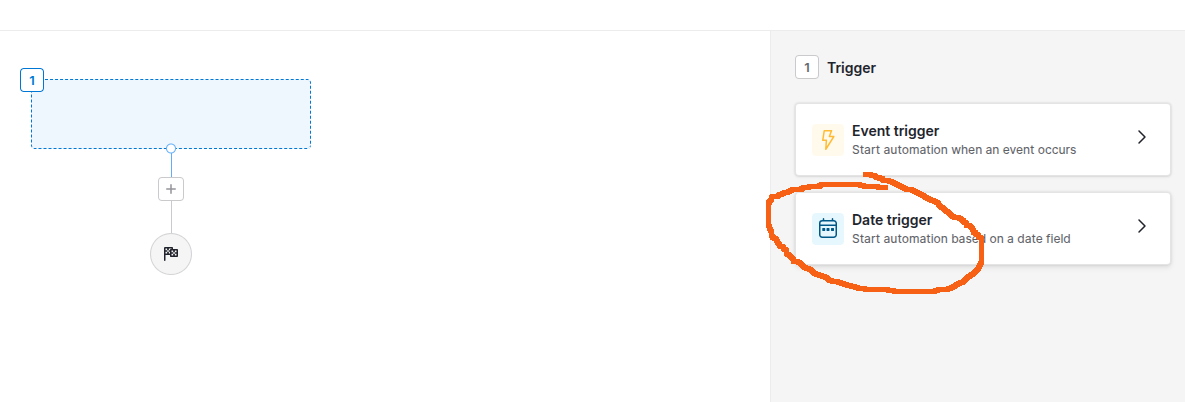
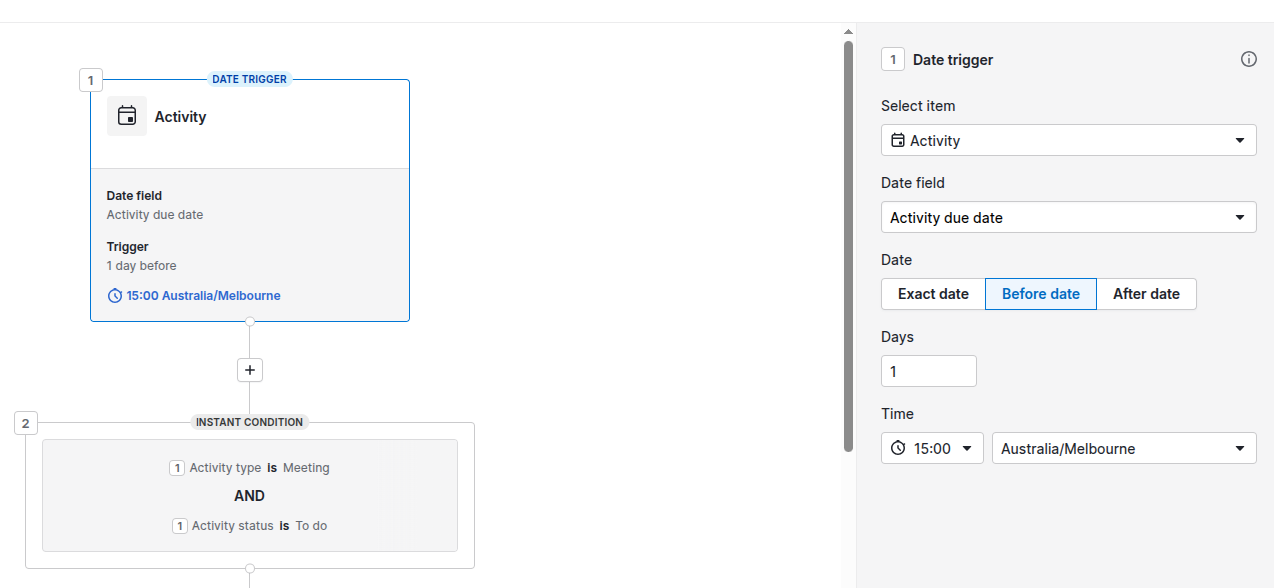
To implement SMS sending we'll need to set up a date triggered workflow automation in Pipedrive that will trigger the day before the due date of the meeting's associated Activity. Date triggers are a relatively new feature in Pipedrive that allow us to trigger a workflow before, on or after a specific day. In this case, we create an activity for each meeting that's booked and the workflow then triggers the day before. The setup looks like this:
Go to Automations, select the +Automation button and then select Date trigger.
In the example below, we've configured the date trigger for the day before an activity is due - e.g. at 3 pm the afternoon before in the Australia/Melbourne timezone and only for Activity Type = Meeting and status = To do.
This workflow assumes that we're following activity based selling best practice and have created an activity for all scheduled meetings (I recommend doing this automatically - creating an activity when a booking is created via Calendly or OnceHub. This can also be done via Zapier or Make)
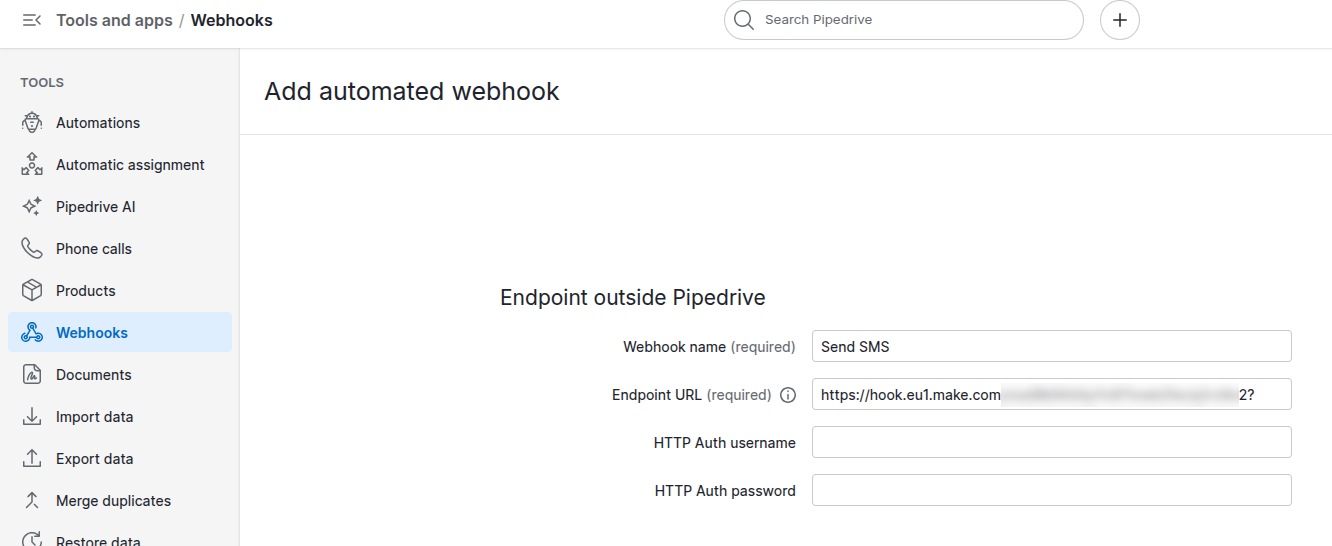
Note that you'll need to add a ? symbol on the end of the Webhook URL - otherwise Pipedrive won't validate it correctly (You'll see the message URL must end with /, &, ?, or =.)
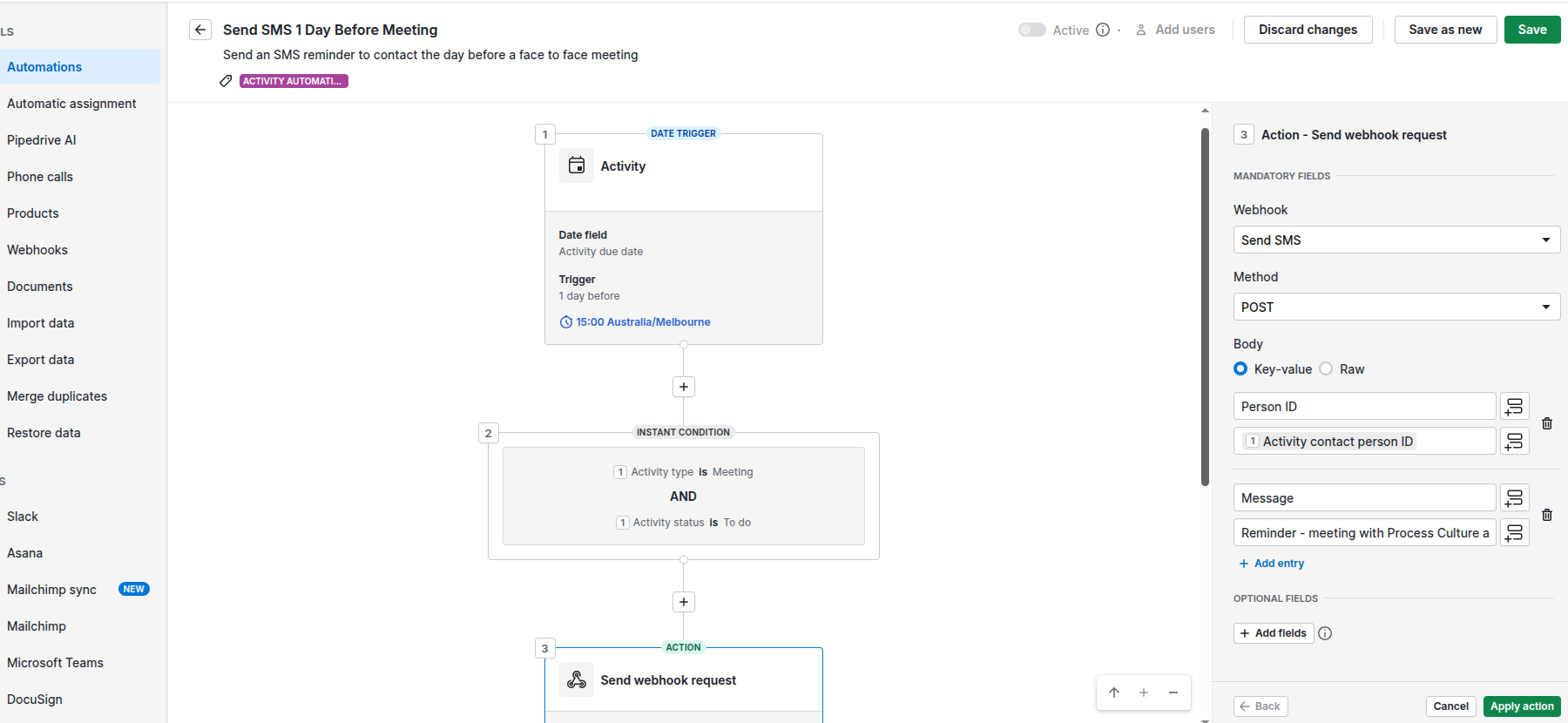
Once the workflow triggers we then call a Make webhook that takes care of sending the SMS via Clicksend. A sample scenario in Make looks like this:
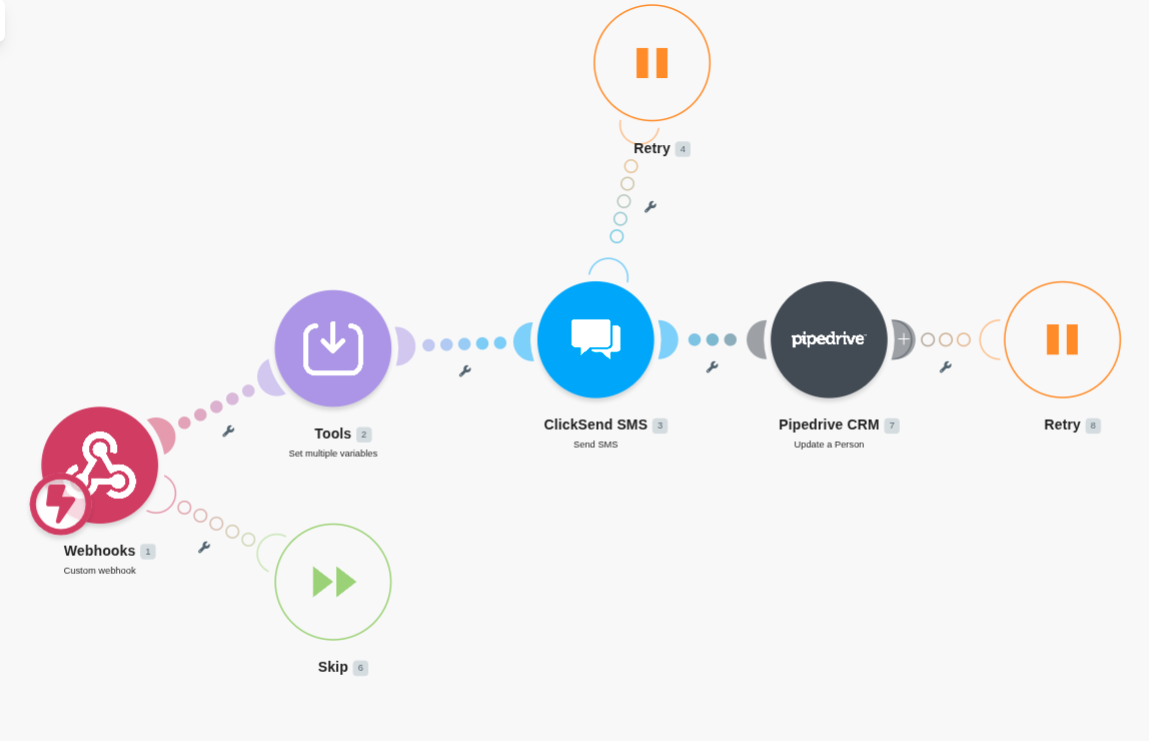
This is an excellent example where we've extended the capability of Pipedrive workflow automation using a third-party automation platform. We find Make to be invaluable for implementing these more complex workflows.
Examples of similar workflows where we've used both Make and Pipedrive automations include:
These two features are often confused, but they serve completely different roles.
Automations are broad, condition-driven workflows that streamline repetitive tasks across your entire sales pipeline - not just communication. They trigger from CRM events like deals created, stages changed, or fields updated, and automatically take action. That might include sending emails, creating activities, updating data, or notifying your team. Think of automations as your CRM's operating system: always running in the background, keeping everything moving without manual input.
Sequences are more hands-on. They're step-by-step workflows built from personalised emails and follow-up tasks, designed to nurture leads over time in a custom way. A salesperson enrols a contact or deal into a sequence - or an automation triggers the enrolment - which then schedules a series of steps over a set time frame. These are linear and can mix manual and automated sends, though the default leans toward rep-reviewed messaging. They're best suited for structured follow-up and lead nurture, rather than broad pipeline automation.
Used together, they're powerful. Automations manage pipeline logic, data hygiene, and internal workflows. Sequences guide consistent, human-led outreach. When combined, they create a scalable and disciplined sales process.
A sales rep identifies 20 target accounts and enrols each contact into a five-step sequence: a connection email on day one, a value-add resource on day four, a relevant case study on day eight, a direct ask on day twelve, and a breakup email on day sixteen. Every email pulls in personalised merge fields. The moment a contact replies, the sequence pauses automatically - so the rep picks up a live conversation, not a script.
Re-engagement of lost deals is something most businesses never bother with. Once a deal is marked Lost, the instinct is to move on and assume that contact is done. But in many cases, timing or budget constraints were the real blocker - not a lack of interest. Unless there's a fundamental mismatch in product fit or the relationship has soured, it's worth reaching out again in the future.
Every quarter, pull all deals with status Lost in the past six months and enrol those contacts into a re-engagement sequence. The first email acknowledges that time has passed. The second shares a relevant product update. The third offers a fresh discovery call. Pair this with an automation that moves the deal back to active when a reply lands, and you're turning dead pipeline into live opportunities - with almost no manual effort.
A note on consent before you hit send. If you're using automated email steps within a Pipedrive sequence, each user on your team needs to individually authorise automated sending before those emails will fire - the sequence will fail at that step if they haven't. But beyond Pipedrive's own requirements, you also need to make sure you're legally covered. In Australia, the Spam Act 2003 requires consent - either express or inferred - before sending any commercial electronic message. If the contact previously engaged with your business during the sales process, you may be able to rely on inferred consent, but only if the message is directly relevant to that prior relationship. When in doubt, it's safer to treat re-engagement emails as requiring fresh express consent. Either way, every email must clearly identify your business, include valid contact details, and provide a functional unsubscribe option. Non-compliance isn't a slap on the wrist - the ACMA has issued fines in the millions for breaches. If you're unsure where you stand, get legal advice before rolling out a re-engagement sequence at scale.
You don't need to build all five automations this afternoon. Pick the one that addresses your biggest bottleneck - stale deals piling up? leads going unassigned? and publish it live. Once your team sees the time it saves, the rest will follow naturally.
The goal isn't to automate everything. It's to automate the things that shouldn't need a human in the first place - so your team can spend their energy where it actually counts.
If you'd like to discuss how to better leverage automation in your own business book a complimentary 30 minute call with us today.
As an Authorized Partner, Process Culture can offer you a 30-day free trial of Pipedrive. Learn more about Process Culture's Pipedrive Consulting services.